
Options Volume with AR2.6.0 - App Store
You'll be able to see results in few seconds.
Publisher Description
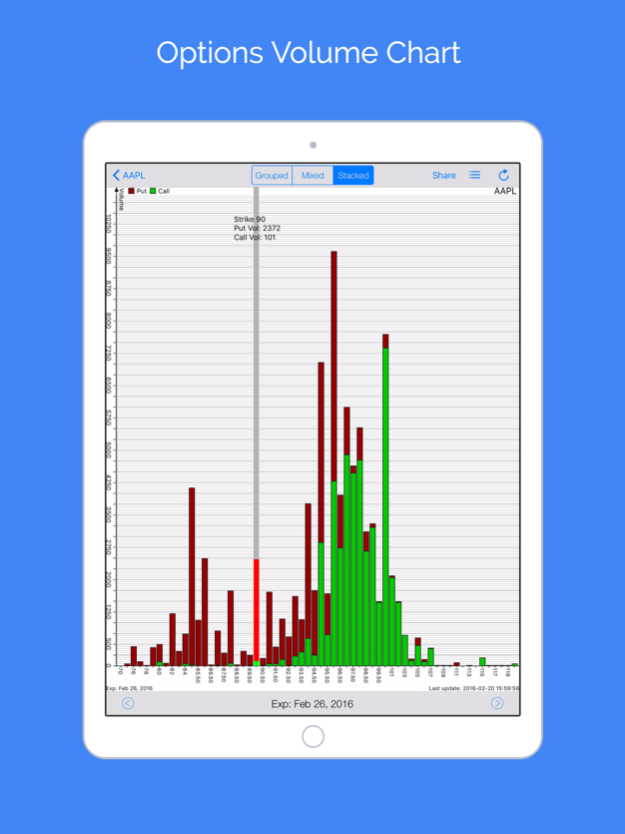
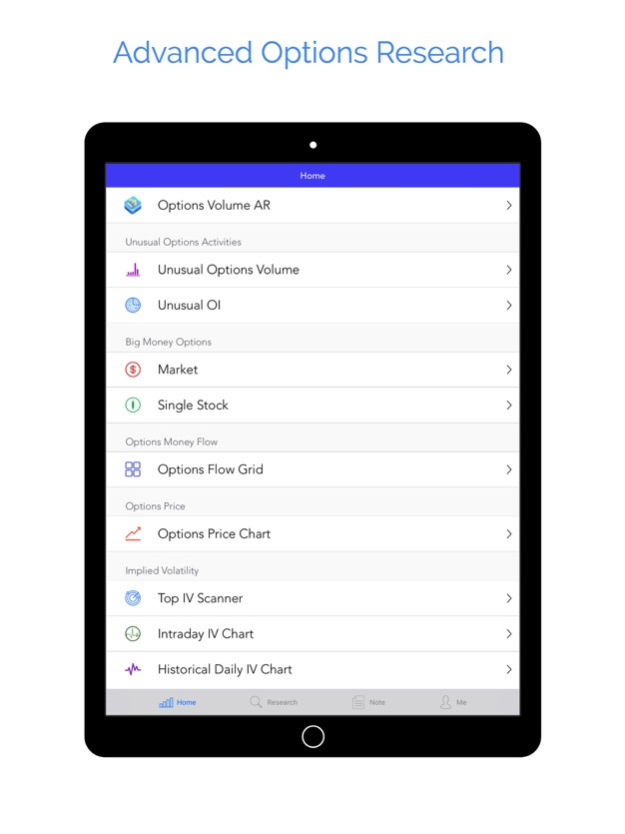


A powerful tool visualizing Options Volume, OI, Max Pain information for optionable stocks in US markets with Advanced Unusual Options Activities Monitor, Big Money Options Scanner, Options Price Chart and Alert, extensive Options Greeks & IV, Live Options Chain, and many more.
iOptionVol provides you information in a special visualized way. Data cover all available expiration dates, from weekly to leaps. All these come with live Advanced Stock Quote (Pre and After market included), high resolution Advanced Stock Chart with multiple technical indicators, multiple Watch-list management, convenient Multi Chart View, Personalized Research Notes, Cloud Sync, Interactive Sector Chart, and so on.
Trading Volume of options is a KEY statistics investors watch besides the price movements in options market. iOptionVol uses a visualized way to present the options volume, open interest, and max pain in various chart styles. Users can check options volume, open interest, and max pain of stocks with options (US markets) for each expiration date. Navigating through different expiration dates is extremely easy by simply tapping the left or right arrow (to switch between expiration dates). The strike, Call / Put volume, OI, Max Pain are displayed by tapping and holding on the chart.
Investors pay great attention to Unusual Options Activities. Sudden surge in options volume or big change in open interest for particular stock usually gives a valuable insight of the real market move under the surface. Our proprietary advanced Unusual Options Volume and OI Monitors continuously scan the market and identifies the significant options activities with detailed volume information, abnormality, multiplier, etc. You can scan according to the options type and volume abnormality.
ADVANCED OPTIONS DATA
------------------------------
■ Live Unusual Options Volume Monitor
■ Live Unusual OI Scanner
■ Live Scan of Big Money Options Activities
■ Options Price Chart
■ Options Price Alert
■ Dynamic Options Chain
■ Index Options supported
■ Extensive Options Greeks, IV, Put-Call Parity calculated in Real-Time for EACH options strike
■ Options Volume, OI, Max Pain Chart
■ Daily Open Interest & Maximum Pain calculation
■ Visualized presentation in Grouped, Mixed & Stacked chart style
■ Current IV
GESTURE TIP
------------------
■ Slide left / right to view the whole chart. Rotate the device to get a wider view.
■ Tap and hold on the chart to see details of the strike.
STOCK & RESEARCH
---------------------------
■ Live Advanced quotes
■ Pre & After market quotes
■ Auto Refresh Quotes
■ Advanced Stock Chart with multiple Technical Indicator, adjustable Parameters, Fibonacci Lines, Pivot Point, Moving Averages, Price Bands, Overlays, etc
■ High Resolution and Full-Screen chart
■ Powerful Multi Chart View
■ Personalized Stock Research Notes with sentiment and trend
■ Easy management of multiple watch-lists
■ Symbol auto completion
■ Interactive Sector Chart of watch-list
■ Cloud Sync
■ Passcode and Touch ID protection
Optional Subscription
Advanced / Pro Plan with Unusual Options Volume & OI Scanning, Big Money Options Scanning, Options Price Chart & Alert, Greeks, etc
- Auto-renewable subscription is optional
- Length: Monthly / Annually
- Price: USD 29.99 / 64.99 / 299.99 / 599.99
- Payment will be charged to iTunes Account at confirmation of purchase
- Subscription automatically renews unless auto-renew is turned off at least 24-hours before the end of the current period
- Account will be charged for renewal within 24-hours prior to the end of the current period
- Subscriptions may be managed by the user and auto-renewal may be turned off by going to the user's Account Settings after purchase
- No cancellation of the current subscription is allowed during active subscription period
- Privacy Policy http://www.mobileinteractive.com/privacy
- Term of Use http://www.mobileinteractive.com/term-of-use/
Contact: appsupport@mobileinteractive.com
Mar 16, 2018
Version 2.6.0
This app has been updated by Apple to display the Apple Watch app icon.
We are very excited to bring you the Augmented Reality (AR) feature in financial data visualization. Now you can visualize Options Volume chart, Options OI chart, and My Watchlist with AR.
1. The screen of your iPhone is no longer the limit; view a lot more data than before.
2. Check the options data in a more detailed way. You can place multiple options charts at multiple places on your desk or floor, and walk around the charts, study the charts from 360-degree angle, and get all details.
3. View 3D options charts of multiple expiration dates. Compare, see the change, see the move, get the trend, you name it.
4. Obtain a natural control and natural user experience. You can easily add and place unlimited number of options charts anywhere, on the desk, floor, sofa, countertop, car hood, and many more. It's fun, useful, and convenient.
5. Now Pro Plus subscribers can view data of the last 7 calendar days for Options Flow grid with the context of detailed options trade; Pro Plan subscribers can also view more data (2-calendar-day data).
6. We also improved annotations on both options and stock chart.
Enjoy the amazing Augmented Reality experiences with our specially designed options visualization. Hope you like them.
About Options Volume with AR
The company that develops Options Volume with AR is Mobile Interactive LLC. The latest version released by its developer is 2.6.0.
To install Options Volume with AR on your iOS device, just click the green Continue To App button above to start the installation process. The app is listed on our website since 2018-03-16 and was downloaded 0 times. We have already checked if the download link is safe, however for your own protection we recommend that you scan the downloaded app with your antivirus. Your antivirus may detect the Options Volume with AR as malware if the download link is broken.
How to install Options Volume with AR on your iOS device:
- Click on the Continue To App button on our website. This will redirect you to the App Store.
- Once the Options Volume with AR is shown in the iTunes listing of your iOS device, you can start its download and installation. Tap on the GET button to the right of the app to start downloading it.
- If you are not logged-in the iOS appstore app, you'll be prompted for your your Apple ID and/or password.
- After Options Volume with AR is downloaded, you'll see an INSTALL button to the right. Tap on it to start the actual installation of the iOS app.
- Once installation is finished you can tap on the OPEN button to start it. Its icon will also be added to your device home screen.
Program Details
System requirements
Download information
Pricing
Version History
version 2.6.0
posted on 2018-03-16
Mar 16, 2018
Version 2.6.0
This app has been updated by Apple to display the Apple Watch app icon.
We are very excited to bring you the Augmented Reality (AR) feature in financial data visualization. Now you can visualize Options Volume chart, Options OI chart, and My Watchlist with AR.
1. The screen of your iPhone is no longer the limit; view a lot more data than before.
2. Check the options data in a more detailed way. You can place multiple options charts at multiple places on your desk or floor, and walk around the charts, study the charts from 360-degree angle, and get all details.
3. View 3D options charts of multiple expiration dates. Compare, see the change, see the move, get the trend, you name it.
4. Obtain a natural control and natural user experience. You can easily add and place unlimited number of options charts anywhere, on the desk, floor, sofa, countertop, car hood, and many more. It's fun, useful, and convenient.
5. Now Pro Plus subscribers can view data of the last 7 calendar days for Options Flow grid with the context of detailed options trade; Pro Plan subscribers can also view more data (2-calendar-day data).
6. We also improved annotations on both options and stock chart.
Enjoy the amazing Augmented Reality experiences with our specially designed options visualization. Hope you like them.
version 1.9.0
posted on 2013-12-03
Disclaimer
Official App Store Link
We do not host Options Volume with AR on our servers. We did not scan it for viruses, adware, spyware or other type of malware. This app is hosted by Apple and passed their terms and conditions to be listed there. We recommend caution when installing it.
The App Store link for Options Volume with AR is provided to you by apps112.com without any warranties, representations or guarantees of any kind, so access it at your own risk.
If you have questions regarding this particular app contact the publisher directly. For questions about the functionalities of apps112.com contact us.
